https://www.virtualbox.org/wiki/Downloads
Downloads – Oracle VirtualBox
This VirtualBox Extension Pack Personal Use and Educational License governs your access to and use of the VirtualBox Extension Pack. It does not apply to the VirtualBox base package and/or its source code, which are licensed under version 3 of the GNU Gene
www.virtualbox.org
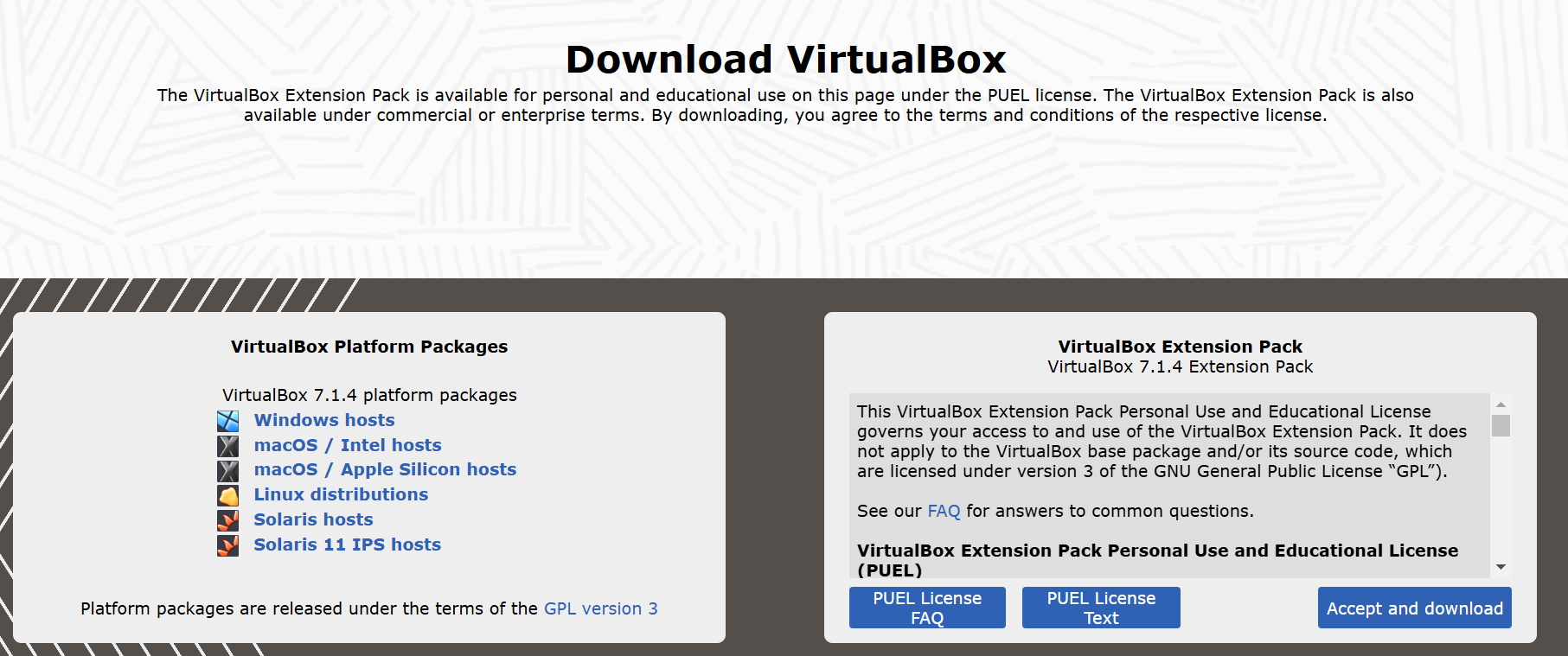
window hosts
- 윈도우에서 설치할 것이므로 클릭하면 exe 파일이 다운된다
https://yum.oracle.com/oracle-linux-isos.html
Oracle Linux ISOs | Oracle, Software. Hardware. Complete.
Oracle Linux Installation Media Download Oracle Linux ISOs
yum.oracle.com
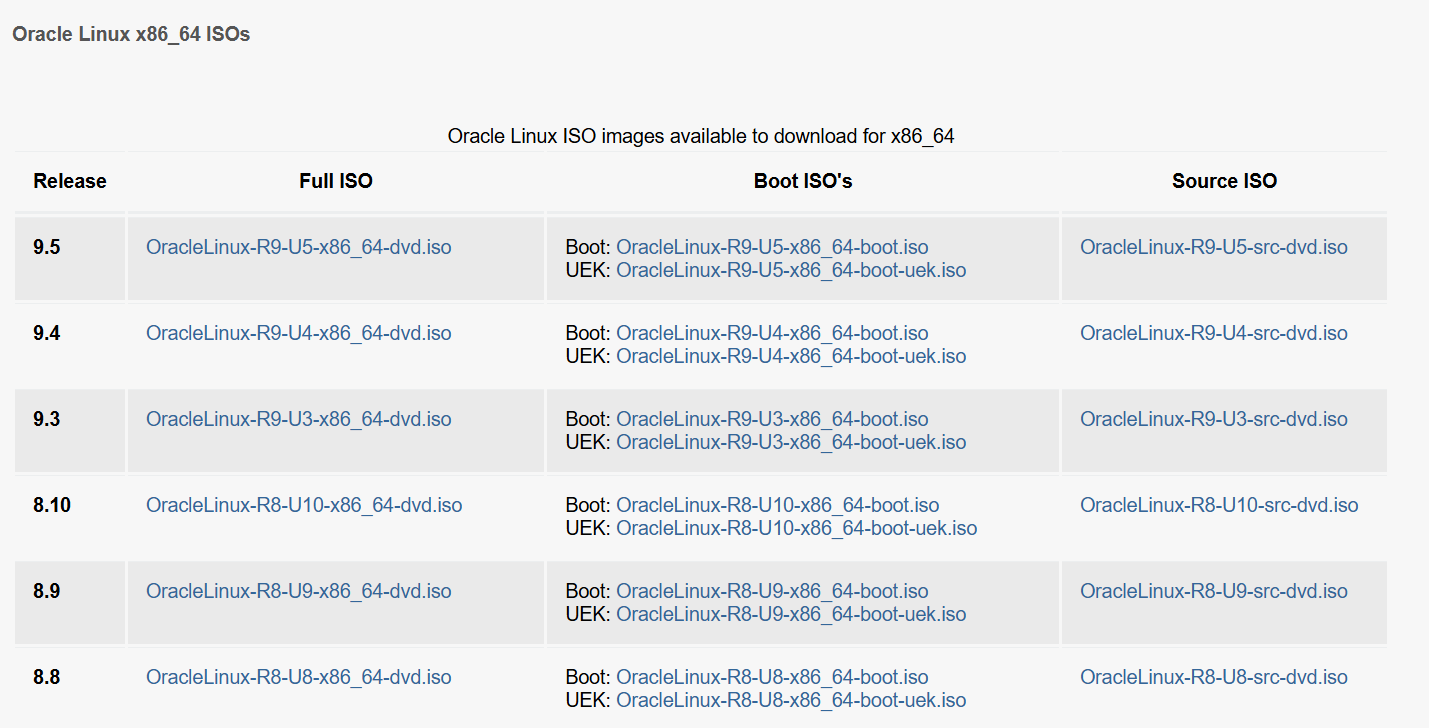
oracle linux 8.8 클릭
- 업무pc가 8.4버전이라 가깝다고 생각하는 8.8을 다운함.
https://mobaxterm.mobatek.net/download-home-edition.html
MobaXterm free Xserver and tabbed SSH client for Windows
The ultimate toolbox for remote computing - includes X server, enhanced SSH client and much more!
mobaxterm.mobatek.net
- MobaXterm
원격 접속 툴 -> 초록색 클릭 (windows에서만 가능, mac은 안됨)
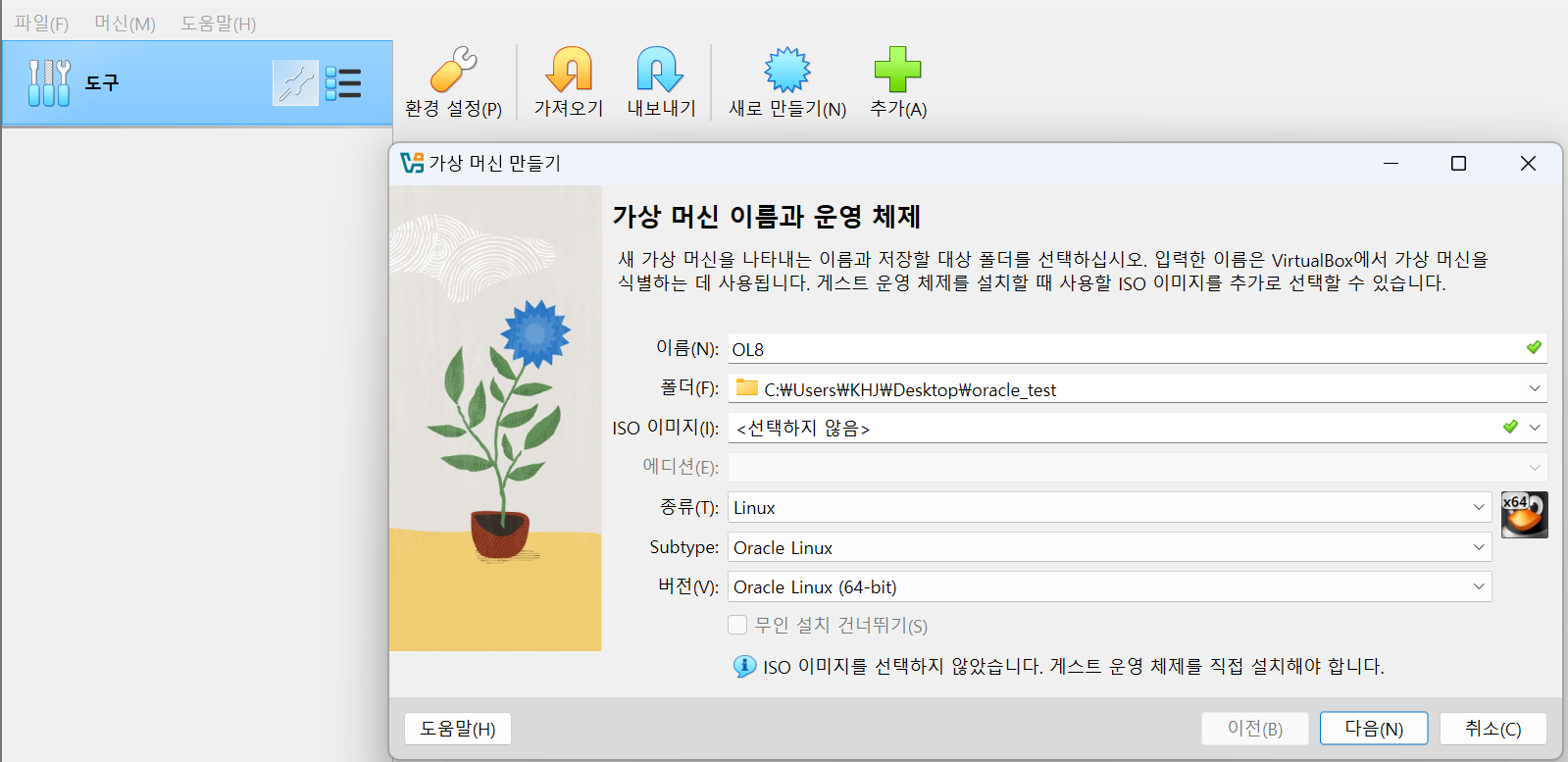
새로 만들기 -> 정보입력
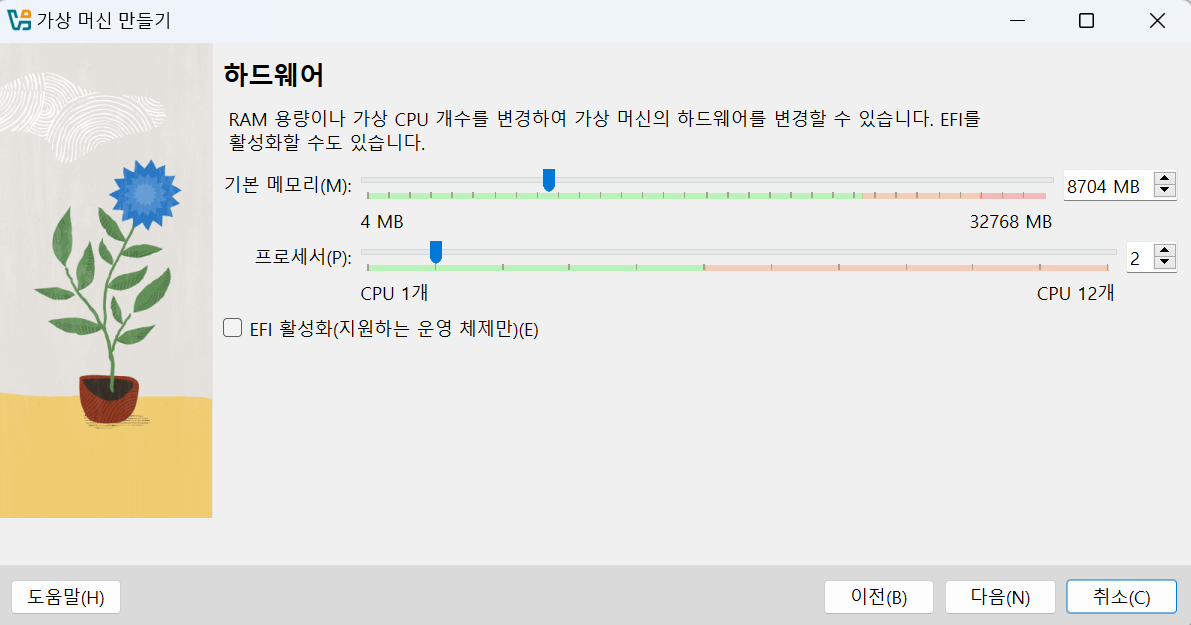
램은 8.5G, 코어는 2개 할당
추후 Grid constructure 환경에서는 최소 8G가 필요하므로 8.5G를 할당함
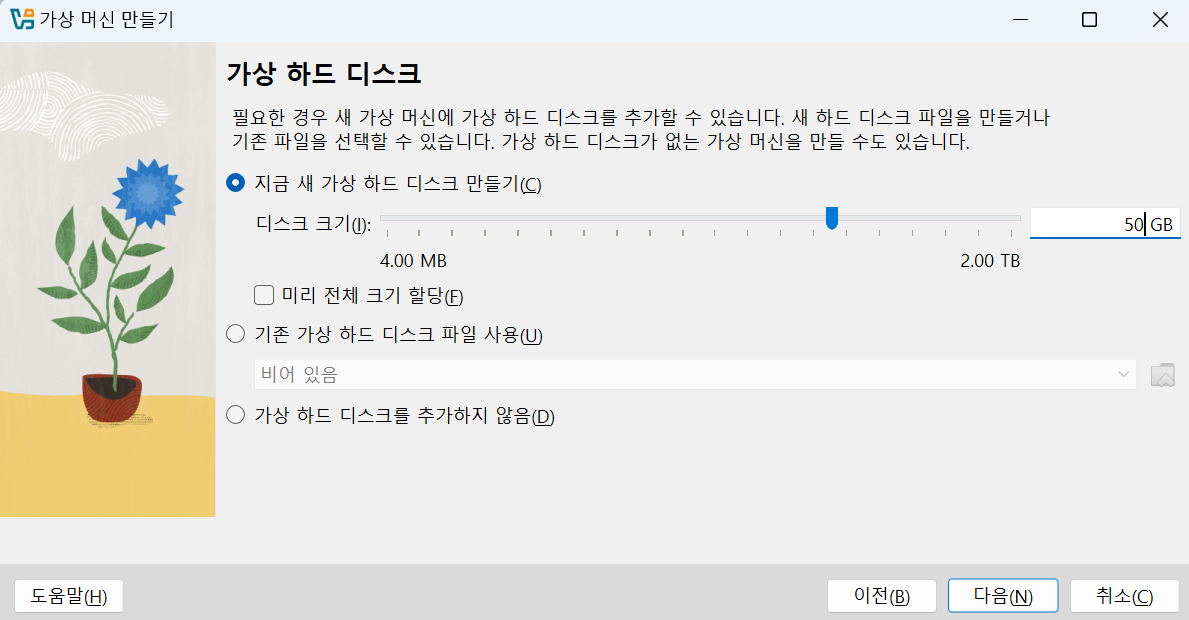
운영체제를 포함하여 파일시스템을 구조를 구성하는 것이기 때문에 50GB할당

요약본
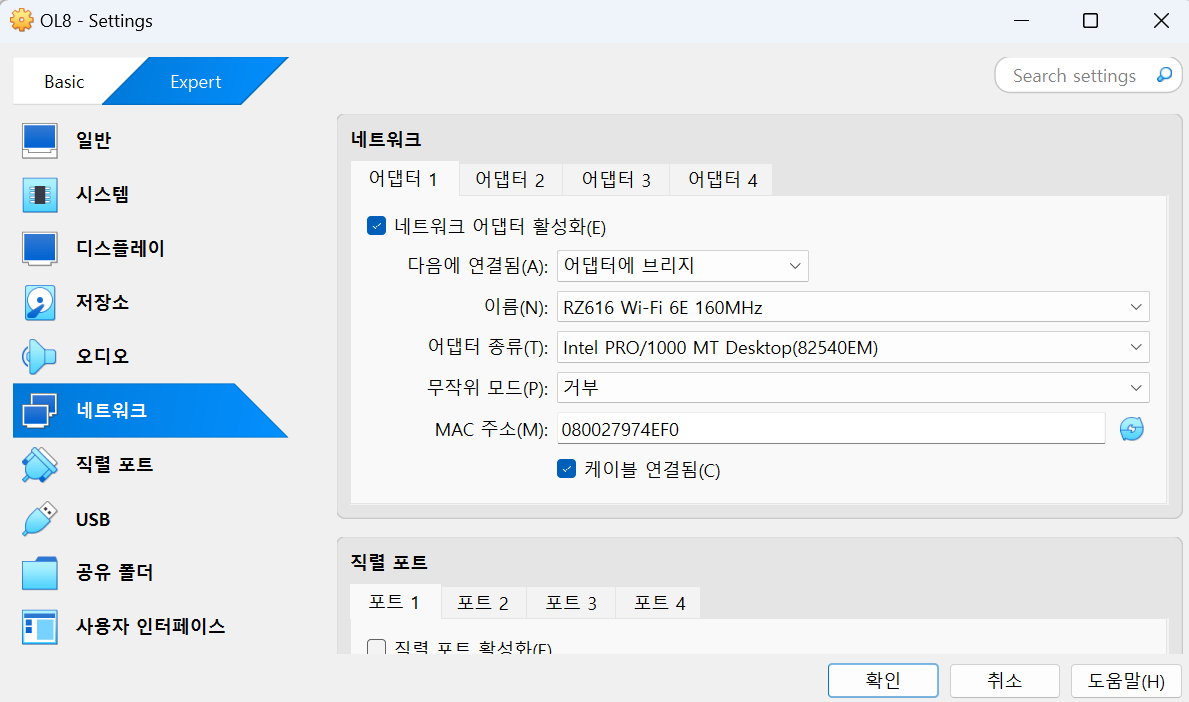
새로 생긴 OL8가상머신에 속성 클릭 -> 네트워크


파일 -> 환경설정 -> 가상머신 -> 호스트 키 콤보 -> shift + ctrl 값 넣기
해당 키를 넣게 되면 추후 터미널에서 종속되어 있는 키를 외부로 꺼내기 편하다.
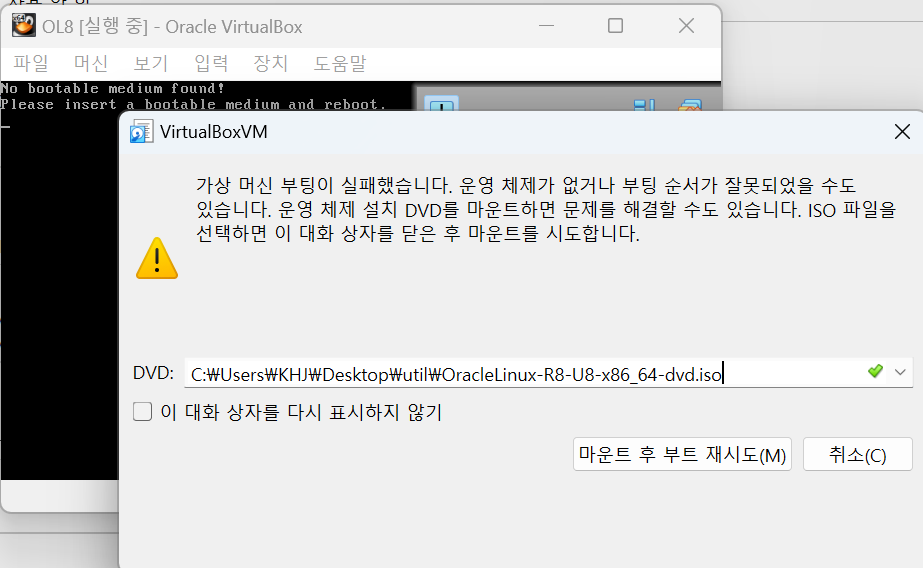
continue


추가로 언어설정, 계정생성 등을 해줌
그리고 설치
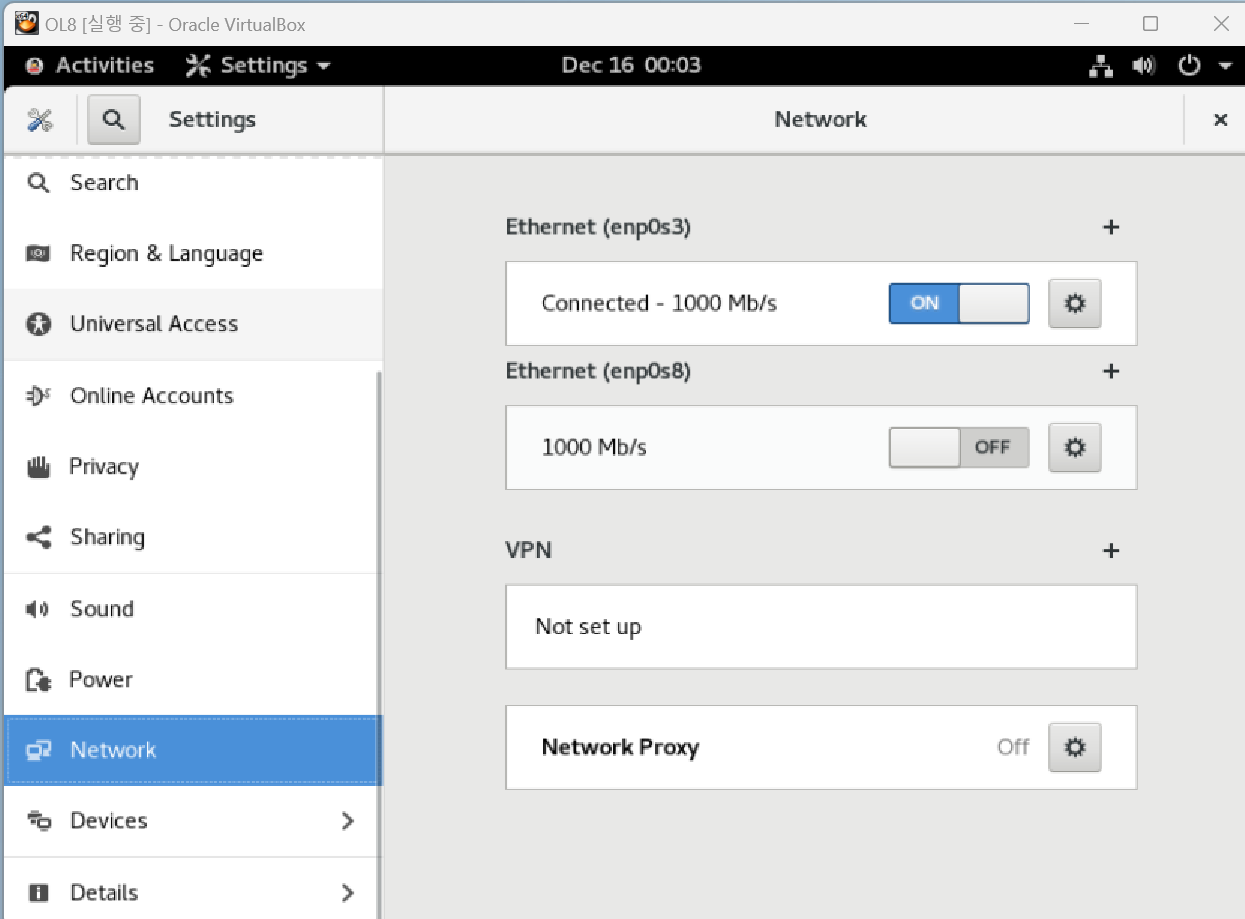
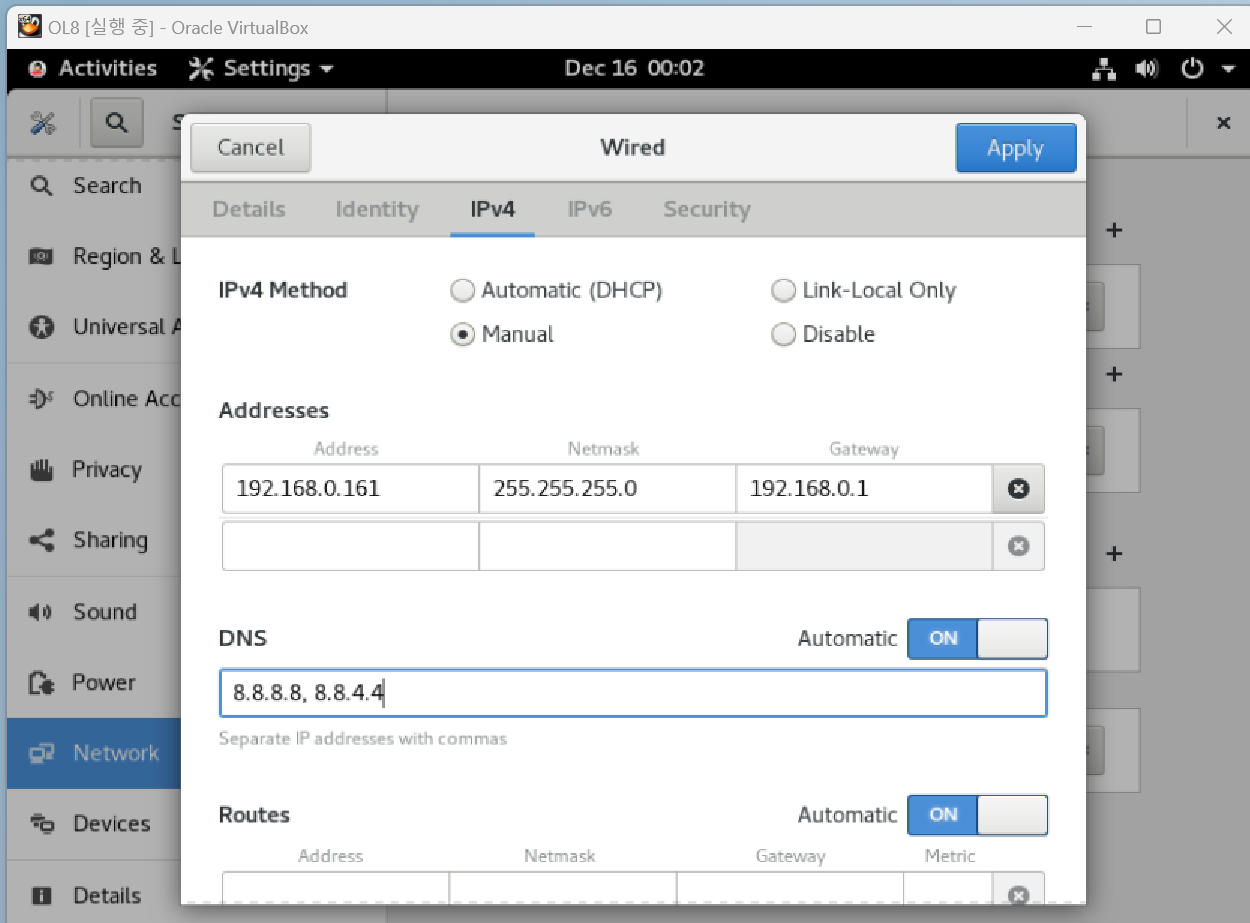
리눅스가 실행되면 여기서 네트워크를 설정한다.
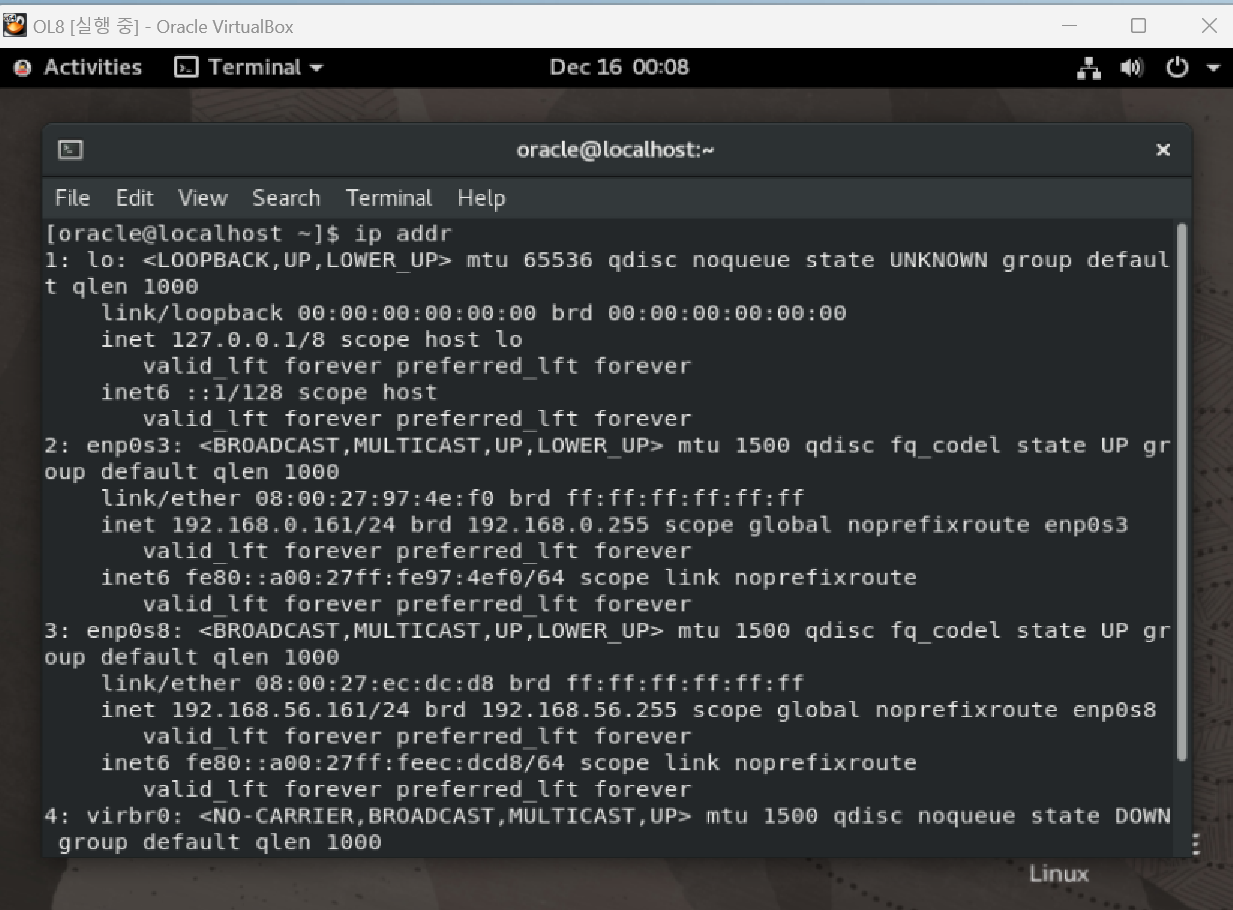
재부팅하고 난 뒤 본인은 케이블이 아닌 wifi라서 따로 인터넷을 켜주어야 위처럼 ip가 설정한 대로 나오는 걸 볼 수 있음

mobaXterm을 켜주고 세션 연결
저 ip가 root인 것은 확실하지 않으니 추후에 확인을 다시 할 예정
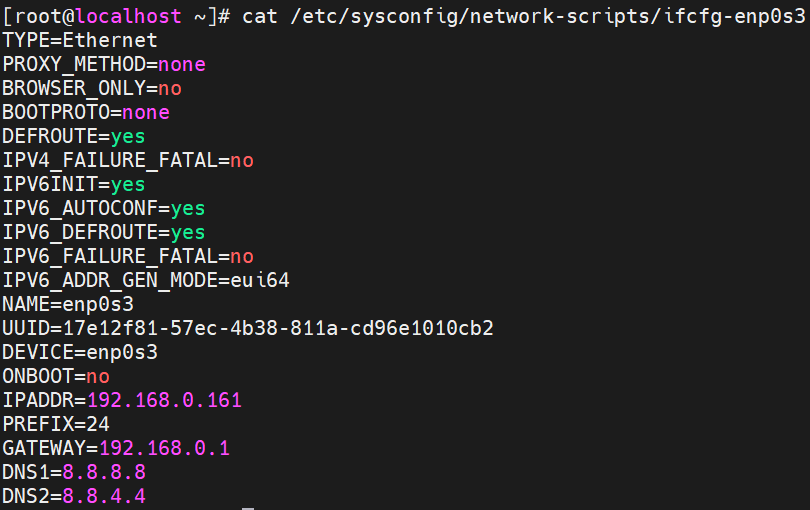
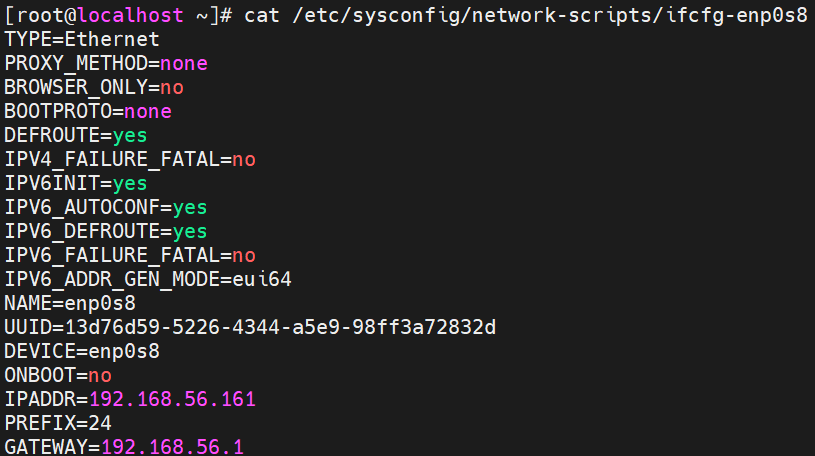
초기 설정한 대로 잘 되어 있는 지 확인

dnf install oracle-database-preinstall-21c

DB설치를 위한 패키지 다운로드

root로 처음에 hostname을 주었기 때문에 이처럼 설정되었다.
그래서 수정이 필요

usermod -g dba oracle
id oracle

wheel과 oracle그룹은 사용하지않을 것이므로 삭제
[root@localhost etc]# cat /etc/group | grep -i wheel; cat /etc/group | grep -i oracle | tail -n 1
wheel:x:10:
oracle:x:1000:
[root@localhost etc]# groupdel oracle; groupdel wheel
[root@localhost etc]# id
uid=0(root) gid=0(root) groups=0(root) context=unconfined_u:unconfined_r:unconfined_t:s0-s0:c0.c1023
[root@localhost etc]# id oracle
uid=1000(oracle) gid=54322(dba) groups=54322(dba)
oracle 계정에 대해 gid,group 모두 dba로 지정된 것을 확인
[root@localhost /]# mkdir -p /u01/app/grid
[root@localhost /]# mkdir -p /u01/21.3.0/grid
[root@localhost /]# chown -R oracle:dba /u01
[root@localhost /]# chmod -R 775 /u01
oracle,grid 엔진설치를 위해 /u01 디렉터리를 생성 후 해당 퍼미션 및 소유자 권한
[root@localhost /]# ll | grep -i u01
drwxrwxr-x.   4 oracle dba    31 Dec 16 01:02 u01
[root@localhost /]# cd u01
[root@localhost u01]# ls -ltr
total 0
drwxrwxr-x. 3 oracle dba 18 Dec 16 01:02 app
drwxrwxr-x. 3 oracle dba 18 Dec 16 01:02 21.3.0
퍼미션, 권한 확인
[root@ol8rac1 etc]# cat hosts
127.0.0.1   localhost localhost.localdomain localhost4 localhost4.localdomain4
::1         localhost localhost.localdomain localhost6 localhost6.localdomain6
[root@ol8rac1 etc]# vi hosts
[root@ol8rac1 etc]# cat hosts
127.0.0.1   localhost localhost.localdomain localhost4 localhost4.localdomain4
::1         localhost localhost.localdomain localhost6 localhost6.localdomain6

### Public IP
192.168.0.161   ol8rac1
192.168.0.162   ol8rac2

### Private IP
192.168.56.161  ol8rac1-priv
192.168.56.162  ol8rac2-priv

## Virtual IP
192.168.0.163   ol8rac1-vip
192.168.0.164   ol8rac2-vip

## Scan IP
192.168.0.165   ol8rac-scan
test를 위해 host파일에 ip 등록 (호스트명이 바뀐 건 미리 테스트해서 바뀌어 있음)
[root@ol8rac1 etc]# hostnamectl set-hostname ol8rac1
[root@ol8rac1 etc]# hostnamectl set-hostname ol8rac1 --pretty
[root@ol8rac1 etc]# hostnamectl set-hostname ol8rac1 --static
[root@ol8rac1 etc]# hostnamectl set-hostname ol8rac1 --transient
[root@ol8rac1 etc]# hostnamectl status
   Static hostname: ol8rac1
         Icon name: computer-vm
           Chassis: vm
        Machine ID: b7c827829e684670a293338637c4f1bc
           Boot ID: 8c39bb8392a548a98b35e7d15b2ff130
    Virtualization: oracle
  Operating System: Oracle Linux Server 8.8
       CPE OS Name: cpe:/o:oracle:linux:8:8:server
            Kernel: Linux 5.15.0-101.103.2.1.el8uek.x86_64
      Architecture: x86-64
[root@ol8rac1 etc]# hostname
ol8rac1
해당 ip 등록
[root@ol8rac1 etc]# grep MemTotal /proc/meminfo
MemTotal:        8329540 kB
[root@ol8rac1 etc]# grep SwapTotal /proc/meminfo
SwapTotal:       4399100 kB
[root@ol8rac1 etc]# dd if=/dev/zero of=/etc/swapfile bs=1024 count=5000000
5000000+0 records in
5000000+0 records out
5120000000 bytes (5.1 GB, 4.8 GiB) copied, 8.8683 s, 577 MB/s
[root@ol8rac1 etc]# mkswap /etc/swapfile
mkswap: /etc/swapfile: insecure permissions 0644, 0600 suggested.
Setting up swapspace version 1, size = 4.8 GiB (5119995904 bytes)
no label, UUID=a4085033-07a7-45b4-b4c0-d37de2ed07ba
[root@ol8rac1 etc]# swapon /etc/swapfile
swapon: /etc/swapfile: insecure permissions 0644, 0600 suggested.
[root@ol8rac1 etc]# grep SwapTotal /proc/meminfo
SwapTotal:       9399096 kB
[root@ol8rac1 etc]# grep MemTotal /proc/meminfo
MemTotal:        8329540 kB
기존에 메모리를 8.5GB로 설정해 주었고 swap메모리는 설정 초깃값으로 되어 있음
SWAP 메모리의경우 일반적으로 1.5배의 사이즈로 지정을 하게 되는데 자동으로 OS 설치함으로 인해 기본 최소사양의 SWAP 설정으로 지정되어 SWAP 사이즈를 늘려주어야 함.
SWAP 메모리를 온라인중에 증설하기 위해서 dd 명령어를 통해서 swap 사이즈를 조정합니다.
[root@ol8rac1 etc]# cat /etc/fstab

#
# /etc/fstab
# Created by anaconda on Sun Dec 15 13:51:42 2024
#
# Accessible filesystems, by reference, are maintained under '/dev/disk/'.
# See man pages fstab(5), findfs(8), mount(8) and/or blkid(8) for more info.
#
# After editing this file, run 'systemctl daemon-reload' to update systemd
# units generated from this file.
#
/dev/mapper/ol-root     /                       xfs     defaults        0 0
UUID=0ca3d995-4b38-4b53-8e3f-0725f777e4d5 /boot                   xfs     defaults        0 0
/dev/mapper/ol-swap     none                    swap    defaults        0 0
[root@ol8rac1 etc]# vi /etc/fstab
[root@ol8rac1 etc]# cat /etc/fstab

#
# /etc/fstab
# Created by anaconda on Sun Dec 15 13:51:42 2024
#
# Accessible filesystems, by reference, are maintained under '/dev/disk/'.
# See man pages fstab(5), findfs(8), mount(8) and/or blkid(8) for more info.
#
# After editing this file, run 'systemctl daemon-reload' to update systemd
# units generated from this file.
#
/dev/mapper/ol-root     /                       xfs     defaults        0 0
UUID=0ca3d995-4b38-4b53-8e3f-0725f777e4d5 /boot                   xfs     defaults        0 0
/dev/mapper/ol-swap     none                    swap    defaults        0 0
/etc/swapfile           swap                    swap    defaults        0 0
/etc/swapfile swap swap defaults 0 0
해당 내용을 추가. 앞서 바꾼 swap메모리를 적용하기 위함.
[root@ol8rac1 etc]# cat /etc/security/limits.conf
# /etc/security/limits.conf
#
#This file sets the resource limits for the users logged in via PAM.
#It does not affect resource limits of the system services.
#
#Also note that configuration files in /etc/security/limits.d directory,
#which are read in alphabetical order, override the settings in this
#file in case the domain is the same or more specific.
#That means for example that setting a limit for wildcard domain here
#can be overriden with a wildcard setting in a config file in the
#subdirectory, but a user specific setting here can be overriden only
#with a user specific setting in the subdirectory.
#
#Each line describes a limit for a user in the form:
#
#<domain>        <type>  <item>  <value>
#
#Where:
#<domain> can be:
#        - a user name
#        - a group name, with @group syntax
#        - the wildcard *, for default entry
#        - the wildcard %, can be also used with %group syntax,
#                 for maxlogin limit
#
#<type> can have the two values:
#        - "soft" for enforcing the soft limits
#        - "hard" for enforcing hard limits
#
#<item> can be one of the following:
#        - core - limits the core file size (KB)
#        - data - max data size (KB)
#        - fsize - maximum filesize (KB)
#        - memlock - max locked-in-memory address space (KB)
#        - nofile - max number of open file descriptors
#        - rss - max resident set size (KB)
#        - stack - max stack size (KB)
#        - cpu - max CPU time (MIN)
#        - nproc - max number of processes
#        - as - address space limit (KB)
#        - maxlogins - max number of logins for this user
#        - maxsyslogins - max number of logins on the system
#        - priority - the priority to run user process with
#        - locks - max number of file locks the user can hold
#        - sigpending - max number of pending signals
#        - msgqueue - max memory used by POSIX message queues (bytes)
#        - nice - max nice priority allowed to raise to values: [-20, 19]
#        - rtprio - max realtime priority
#
#<domain>      <type>  <item>         <value>
#

#*               soft    core            0
#*               hard    rss             10000
#@student        hard    nproc           20
#@faculty        soft    nproc           20
#@faculty        hard    nproc           50
#ftp             hard    nproc           0
#@student        -       maxlogins       4

# End of file

###Add Oracle RAC Parameter
oracle          soft    nofile          4096
oracle          hard    nofile          65536
oracle          soft    nproc           16384
oracle          hard    nproc           16384
oracle          soft    stack           10240
oracle          hard    stack           32768
oracle          soft    memlock         3145728
oracle          hard    memlock         3145728
아래 ###Add oracle RAC Parameter 추가.
[root@ol8rac1 etc]# systemctl enable chronyd
Created symlink /etc/systemd/system/multi-user.target.wants/chronyd.service → /usr/lib/systemd/system/chronyd.service.
[root@ol8rac1 etc]# systemctl start chronyd
[root@ol8rac1 etc]# systemctl status chronyd | grep -i active
   Active: active (running) since Mon 2024-12-16 01:25:06 KST; 59min ago
[root@ol8rac1 etc]# chronyc sources -v

  .-- Source mode  '^' = server, '=' = peer, '#' = local clock.
 / .- Source state '*' = current best, '+' = combined, '-' = not combined,
| /             'x' = may be in error, '~' = too variable, '?' = unusable.
||                                                 .- xxxx [ yyyy ] +/- zzzz
||      Reachability register (octal) -.           |  xxxx = adjusted offset,
||      Log2(Polling interval) --.      |          |  yyyy = measured offset,
||                                \     |          |  zzzz = estimated error.
||                                 |    |           \
MS Name/IP address         Stratum Poll Reach LastRx Last sample
===============================================================================
^* mail.innotab.com              3   6    17     9   -260us[  +30us] +/-   11ms
^+ 141.164.43.237.vultruser>     2   6    17    10   +255us[ +545us] +/-   20ms
[root@ol8rac1 etc]# timedatectl
               Local time: Mon 2024-12-16 02:24:47 KST
           Universal time: Sun 2024-12-15 17:24:47 UTC
                 RTC time: Sun 2024-12-15 17:24:24
                Time zone: Asia/Seoul (KST, +0900)
System clock synchronized: yes
              NTP service: active
          RTC in local TZ: no
[root@ol8rac1 etc]#
Grid Infrastructure 설치 시 NTP에 대한 설정 정보를 물어보기 때문에 NTP 데몬 활성화 후 설정을 하도록 함
timedatectl or chronyc sources -v 명령어를 통해서 NTP 외부 서버와 동기화가 되었는지 확인함
'STUDY > DB' 카테고리의 다른 글
| 셋팅 3번 Oracle asm 구성 (0) | 2024.12.16 |
|---|---|
| vitual machine 셋팅(2) -공유 스토리지 구성 (0) | 2024.12.16 |
| SQL MERGE (0) | 2024.10.13 |
| SQL집계함수 ROLLUP()이란? (0) | 2024.10.13 |
| 티베로 아키텍쳐 (0) | 2024.09.09 |


댓글